


Download Pinpoint – Free Keystroke Launcher for Windows & Mac
Pinpoint is a lightweight, free, and open-source keystroke launcher tool designed to supercharge your productivity on Windows and Mac. Developed by independent creator Gustav V. Y. (dkgv), this powerful software allows users to launch applications, perform web searches, and manage system tasks with just a few keystrokes.
By pressing Alt + Space, you instantly summon a sleek, floating search bar that delivers lightning-fast results. Whether you're a power user, developer, or everyday computer enthusiast, Pinpoint streamlines your workflow by eliminating the need to navigate through cluttered Start menus or desktop icons. With built-in support for plugins like clipboard history, weather updates, and Spotify controls, Pinpoint evolves beyond a simple app launcher into a versatile desktop assistant.
Its minimalist design and seamless integration make it a secure, efficient alternative to tools like LaunchBar Commander and Ueli. The software is available as both an installable version and a portable app, making it ideal for users who value flexibility and privacy. Although still in early development, Pinpoint consistently improves with each update, offering a glimpse into the future of intelligent, keyboard-driven computing.
Key Features of Pinpoint – Why It Stands Out
Pinpoint isn’t just another app launcher—it’s a productivity powerhouse built for speed and simplicity. One of its standout features is the instant search bar triggered by Alt + Space. Unlike traditional menus, this floating interface appears seamlessly over your current window, allowing you to launch apps, search files, or even initiate web queries without breaking your flow.
The search algorithm is intelligent and learns from your usage patterns, delivering faster results over time. Another major advantage is its plugin ecosystem, which extends functionality far beyond basic launching. The clipboard manager plugin lets you access your recent copy-paste history with a single keystroke, perfect for developers and writers.
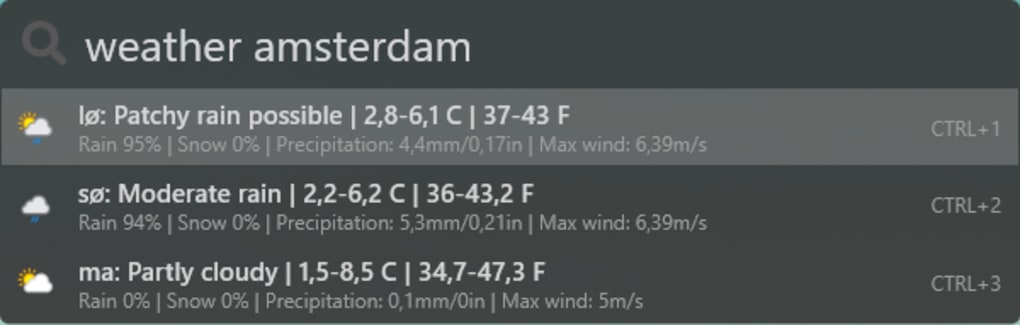
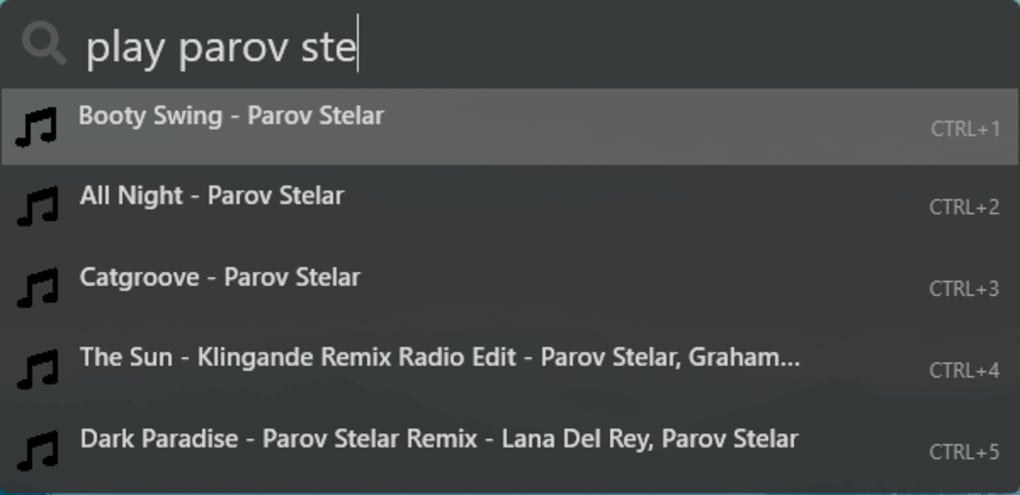
The weather plugin displays real-time forecasts directly in the launcher, so you can check the conditions without opening a browser. For music lovers, the Spotify control plugin enables play, pause, skip, and volume adjustments—ideal for hands-free control during work sessions.
Pinpoint also supports custom command shortcuts, allowing you to define your own actions. For example, typing “calc” launches the calculator, while “wiki topic” performs a Wikipedia search. This level of customization makes it adaptable to any workflow.
The software is lightweight and secure, consuming minimal system resources and requiring no internet access for core functions—ensuring your privacy remains intact. Additionally, it’s fully open-source, meaning the code is transparent and community-reviewed, reducing the risk of hidden tracking or malware. With support for both Windows and Mac, Pinpoint delivers a consistent experience across platforms.
Whether you're using it at home, in the office, or on a portable drive, it adapts seamlessly. These features, combined with regular updates and active development, make Pinpoint a compelling choice for anyone seeking a fast, reliable, and free keyboard-based tool.
How to Install and Use Pinpoint on Windows and Mac
Getting started with Pinpoint is straightforward and requires minimal setup. To download Pinpoint, visit the official GitHub repository, where you can choose between the installable version and the portable version. The installable version adds shortcuts to your Start menu and integrates smoothly with system startup, while the portable version runs directly from a USB drive or folder—ideal for users who prefer not to install software on shared or restricted machines. Once downloaded, simply run the installer or extract the portable package to begin.
After installation, launch Pinpoint from the Start menu (Windows) or Applications folder (Mac). The app will appear as a small icon in your system tray, ready to use. To activate the launcher, press Alt + Space—a quick, non-intrusive shortcut that won’t interfere with existing keyboard shortcuts.
A clean, minimal search bar will appear, where you can type the name of any installed application. As you type, Pinpoint instantly filters results, showing matching apps, files, or commands. Double-click the desired result to open it, or use Ctrl + Number to select from the list using keyboard navigation.
For advanced users, the settings menu (accessible via the system tray icon) allows you to tweak appearance, keyboard shortcuts, and plugin configurations. You can also enable or disable plugins like clipboard history, weather, and Spotify control based on your needs.
Pinpoint also supports custom search queries. For instance, typing “google search term” will open a new browser tab with the search results. This feature turns Pinpoint into a quick search engine, saving time and reducing tab clutter.
The software updates automatically through the GitHub releases page, ensuring you always have the latest features and security patches. With its intuitive interface and minimal learning curve, Pinpoint is suitable for both beginners and advanced users. Whether you're launching a program, checking the weather, or managing your clipboard, Pinpoint makes every task faster and more efficient.
Pros and Cons of Using Pinpoint – Honest Review
Pinpoint delivers a refreshing take on productivity tools, combining speed, simplicity, and extensibility. One of its biggest strengths is its lightweight performance. Unlike bloated launchers that slow down your system, Pinpoint runs smoothly even on older machines, using minimal RAM and CPU.
The keyboard-first design is a game-changer—once you get used to Alt + Space, you’ll wonder how you ever worked without it. The plugin system is another highlight, offering real value beyond basic app launching. The clipboard manager alone saves countless hours, especially when copying code snippets or text across projects.
However, Pinpoint isn’t without its flaws. As a young, open-source project, it occasionally suffers from random crashes, particularly when multiple plugins are active. Some users have reported inconsistent behavior with third-party plugins, where features don’t load reliably.
Additionally, the user interface lacks advanced customization options—you can’t change fonts, colors, or layout themes, which may disappoint design-focused users. The documentation is minimal, and while the plugin descriptions help, there’s no official guide or video tutorial. Despite these drawbacks, the core functionality remains rock-solid, and the developer is responsive to feedback and actively improving the software.
- Pros: Free and open-source, lightweight, fast app launching, plugin support, portable version available, secure, cross-platform (Windows & Mac), minimal system impact.
- Cons: Occasional crashes, inconsistent plugin performance, limited UI customization, sparse documentation, still in early development.
Frequently Asked Questions (FAQ)
-
Is Pinpoint free to download and use?
Yes, Pinpoint is completely free and open-source. You can download and use it without any cost or restrictions. The software is hosted on GitHub, where the source code is publicly available for review and contribution.
-
Does Pinpoint work on Mac and Windows?
Yes, Pinpoint supports both Windows and Mac operating systems. The installer and portable versions are available for each platform, ensuring a consistent experience across devices.
-
Can I use Pinpoint to search the web?
Absolutely. Pinpoint allows you to perform web searches directly from the launcher. Simply type “google query” or “wiki topic” to open a new browser tab with the results.
-
How do I access the clipboard history?
Enable the clipboard manager plugin in the settings menu (right-click the system tray icon). Once active, you can access your recent clipboard entries by typing “clipboard” in the launcher.
-
Is Pinpoint safe to use?
Yes, Pinpoint is secure. As an open-source tool, its code is transparent and regularly reviewed. It doesn’t require admin privileges to run and doesn’t collect user data. Always download from the official GitHub page to ensure authenticity.
Final Verdict: Is Pinpoint Worth Trying?
Pinpoint is a promising, free, and open-source keystroke launcher that delivers real value for productivity-focused users. While still in its early development stages, it already outperforms many commercial alternatives in speed, simplicity, and privacy. Its ability to launch apps, manage clipboard history, check weather, and control Spotify—all from your keyboard—makes it a versatile tool for daily use.
The fact that it’s lightweight, secure, and available for both Windows and Mac is a major plus. Yes, occasional crashes and inconsistent plugins are drawbacks, but they’re expected in a young project. With active development and a growing community, Pinpoint is poised to become a top-tier launcher in the near future.
If you’re looking to boost your workflow, reduce mouse dependency, and enjoy a faster, more intuitive computing experience, download Pinpoint today. Whether you're a student, professional, or tech enthusiast, this free tool is worth adding to your digital toolkit. Don’t wait—experience the power of instant access with just a few keystrokes.







